The Git habits that made reviewers trust me before they read a single line of code
How a structured branching strategy, conventional commits, and knowing when to use cherry-pick instead of a full merge helped me stand out when contributing to projects on GitHub, GitLab, Azure DevOps, and AWS CodeCommit.
Most developers treat Git as a save button. Commit when something works. Push before you go to sleep. That’s it. And honestly, it gets the job done, right up until you start sending PRs to projects with real reviewers, or working on teams where the commit history actually has to make sense to someone else.
Here’s the thing: reviewers form an opinion about you before they open a single file. The branch name, the commit messages, the PR description, all of it is visible before they click into the diff. I figured this out sending contributions to projects across GitHub, GitLab, Azure DevOps, and AWS CodeCommit. The feedback loop was fast. Clean work got reviewed and merged. Noisy work got follow-up questions, or sat in the queue.
So here’s what I actually do.
Three permanent branches, clear purpose for each
I keep three long-lived branches. That’s it.
main: production only. Nothing goes here without a PR that passed UAT. This branch is protected.uat: staging and pre-production testing. Business users validate here before anything touches main.dev: where everything starts. Features, fixes, experiments, all of it begins here.
The exact names are not the point, and I want to be clear about that before anyone argues about it. Some projects call production master, some main. Pre-prod might be uat, staging, or stage. The integration branch might be dev or devel. That choice belongs to the maintainer, and more often it is already settled by how the company, the SaaS team, or the OSS project has always done it. When you join, you inherit the convention; you don’t get to relitigate it. What actually matters is that there are stable, named tiers, that everyone knows which tier means what, and that the protected one is genuinely protected. Match the local vocabulary and apply the same discipline underneath it. I use main, uat, and dev here because that is the naming on the projects I am describing.
The reason for a dedicated pre-prod branch (not just a tag or a deploy config) is that it gives you a stable checkpoint. When you find a bug there, you know it’s code that passed dev but failed real-world testing. That’s a different category of bug than something that never left the developer’s machine, and it deserves a different branch to fix it.
Short-lived branches with a naming pattern that explains itself
When I start any new piece of work I create a branch from the right source and name it properly:
# Feature from dev
git checkout dev && git pull origin dev
git checkout -b feat/user-authentication

# Bug found during UAT testing
git checkout uat
git checkout -b bugfix/cart-crash-fix

# Production emergency
git checkout main
git checkout -b hotfix/prod-db-connection
The prefixes matter. feat/, bugfix/, hotfix/, test/: any reviewer or CI system that sees these knows the category of the work before it looks at anything else. And because the branch name describes the problem, not the implementation, it reads the same to a human and to a ticket system.
Hotfixes are the one case where you merge in three directions: back into main, uat, and dev. Missing one creates drift and you’ll feel it later.
Conventional commits: the part that changed how I write history
This is the single highest-leverage change I made to how I use Git. The format is simple:
<type>(<scope>): <description>Types I use:
feat: new featurefix: bug fixdocs: documentation onlyrefactor: restructured code, no behavior changeperf: performance improvementtest: tests added or updatedchore: build tooling, CI, dependencies
A real example from one of my projects:
feat(auth): add JWT refresh token rotation

Implements sliding expiration using a short-lived access token (15m)
and a rotating refresh token (7d). Old refresh tokens are invalidated
immediately on use to prevent token replay.

Closes: #142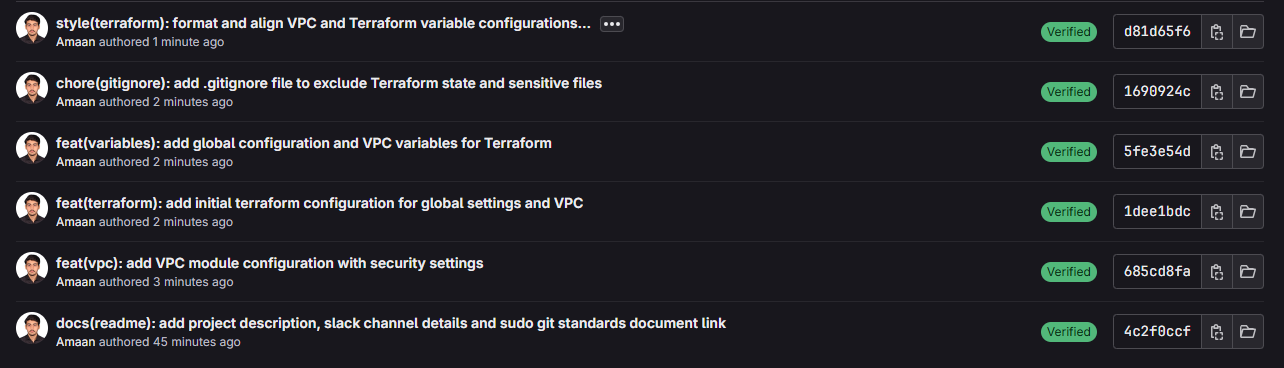
When I send a PR with a history like this, reviewers can read the commit log like a changelog. They don’t have to reverse-engineer what I did from the diff. And when something breaks in production six months later, the person doing the post-mortem can git log --oneline and actually understand the sequence of events.
Semantic versioning falls out of this naturally too. If all your commits since the last tag are fix:, you ship a patch. If there’s a feat:, it’s a minor. If anything has a BREAKING CHANGE in the footer, it’s a major. Your CHANGELOG.md can be generated automatically. Your release tags follow v1.2.3. No guessing.
git tag -a v1.0.0 -m "Release version 1.0.0"
git push origin --tags
Cherry-pick: when you need one thing from a branch, not the whole branch
This is the tool most developers don’t reach for until they’re stuck, and then they use it wrong. Here’s the actual use case.
I had a project where uat and main had diverged significantly. Both branches had been accumulating changes. We needed the azure-pipelines.yml from uat in main, just that one file, because getting the pipeline consistent across environments was blocking the team. A full merge would have pulled in unvalidated changes, and that is not acceptable for a protected branch.
So instead of a merge request, I used cherry-pick to move exactly the commits that touched that file.
First, find the commits that changed the file in the source branch:
git checkout uat
git log uat -- azure-pipelines.yml --oneline
Output:
b5df122 feat: update Azure Pipelines configuration to specify custom agent pool and demands
44cbc1e feat: update image tag for crmiskuat container to use 'uat' version
8fee9b4 feat: add Azure Pipelines configuration for OCI image build and push
Switch to the target branch and apply them in order (oldest first):
git checkout main
git cherry-pick 8fee9b4 44cbc1e b5df122
If there’s a conflict on just that file:
# Resolve the conflict in your editor, then:
git add azure-pipelines.yml
git cherry-pick --continue
This creates new commits on main with the same changes but different hashes. The original commits stay on uat. You get a clean, traceable history on main without dragging in anything that wasn’t ready.
The key thing to understand: cherry-pick is not a shortcut for avoiding code review. You still open a PR with these commits. The difference is that the PR is surgical. It does one thing, and reviewers can verify exactly what that thing is.
The PR description template I actually fill out
A PR is a document. If the description is empty or says “fix stuff,” you’re forcing the reviewer to read the entire diff to understand context that you already have in your head.
## Linked Issue / Ticket
<!-- GitHub/GitLab: Closes #123 | Jira: PROJECT-456 | Azure DevOps: AB#789 -->
Closes #

## Summary
Brief description of what this MR accomplishes.

## Changes
- Specific change with context
- Another change and why it was necessary

## Testing
- [ ] Unit tests added/updated
- [ ] Integration tests pass
- [ ] Manual testing completed in dev/UAT

## Screenshots (if applicable)

## Checklist
- [ ] Code follows project standards
- [ ] Self-review done
- [ ] No new warnings
- [ ] Documentation updated
This is not bureaucracy. It’s a forcing function for you to think through what you did before someone else has to. Half the time, filling out the testing checklist is when I catch something I missed.
Post-merge cleanup
After a branch merges, delete it. Both locally and remotely.
git branch -d feat/user-authentication
git push origin --delete feat/user-authentication
A repository with 200 stale branches is a repository nobody trusts. Clean branches signal that someone is actually maintaining this.
Why this matters more now, not less
The argument I used to hear against structured commits was that it slows you down. Write the code, get it working, the history is just metadata.
That argument has fully inverted. AI code review tools, automated changelog generation, semantic release pipelines: all of them work significantly better when the commit history is structured. When I use an AI assistant to review a PR now, it reads the conventional commits and understands the intent without me explaining it. When I ask it to generate release notes, it has something to work from.
But more fundamentally, across reviewers at AWS, GitHub, GitLab, and Azure, the pattern was the same. The PRs that got attention were the ones that looked like the contributor had thought it through. Clean branch name, useful commits, filled-out description. It signals that you respect the reviewer’s time, and that is the actual thing that builds trust.
The technical content still has to be right. But a well-structured contribution gets a genuine review. A sloppy one gets skimmed.
The actual workflow in one place
# Start a feature
git checkout dev && git pull origin dev
git checkout -b feat/your-feature

# Work in small, meaningful commits
git add src/specific-file.ts
git commit -m "feat(auth): add token expiry validation"

# Push and open PR to dev
git push origin feat/your-feature

# After merge, clean up
git branch -d feat/your-feature
git push origin --delete feat/your-feature
That’s it. No magic. Just consistency applied over enough time that it becomes automatic.
Also published on DEV.to, AWS Builder Center, and Hashnode.
Cite this post
@misc{siddiqui2026git,
  author       = {Siddiqui, Amaan Ul Haq},
  title        = {The Git habits that made reviewers trust me before they read a single line of code},
  year         = {2026},
  howpublished = {Amaan's Engineering Notes},
  url          = {https://amaanx86.github.io/blog/git-discipline-that-built-trust/},
  note         = {Source: https://github.com/amaanx86/amaanx86.github.io/blob/main/src/content/blog/git-discipline-that-built-trust.md},
  orcid        = {0009-0003-4839-9727}
}